[raw]

This site is dedicated to my long-time hobby, nature photography. For many years, I’ve been enjoying outdoor adventures throughout the southwestern United States, particularly in Arizona, Utah, California, and New Mexico.
Over the time, I keep adding links to other web sites that discuss tools and techniques used to capture and process digital images as well as tools and methods for generating graphical or display outputs.
Finally, Gallery links at the top lead to a variety of album images created over a decade of pleasurable work. They are organized loosely by location and topics. You will find here selection of photos from Grand Canyon, Monument Valley, Bryce Canyon, Petrified Forest, Antelope Canyon, and from a various places across the Arizona.
For details on technical aspects of digital color imaging, visit my Digital Photography site.
About pictures
The darkest image in the series was shot on a bright sunny day around noon. It is a digitally processed image of a well-known plant Datura, found in the southwest and blooming during the late summer. Datura is also known as Devil’s trumpet.
[captionpix imgsrc=”http://www.marcelpatek.com/blog/wp-content/themes/Carta/images/midnightblue_off.jpg” captiontext=”Devil’s trumpet” imgalt=”Datura” imgtitle=”Datura” imglink=”http://www.marcelpatek.com/blog/wp-content/themes/Carta/images/Wildlife03.jpg” align=”right” height=”157″ width=”235″]
With a simple use of “Midnight blue” stylizing filter from the Nik Color Efex Pro series, a nice glowing effect was achieved. Larger view can be seen by clicking the image.
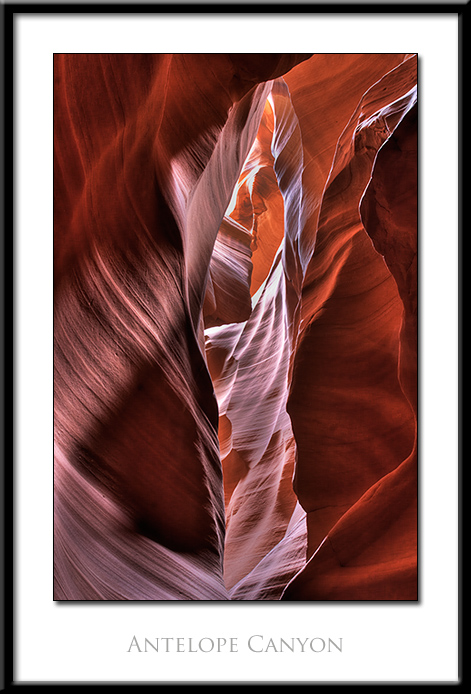
The image on the left was shot in the Antelope Canyon, Arizona. It comes from a bracketed sequence of RAW exposures that were merged together to provide 32-bit High Dynamic Range (HDR) image. This composite was then tone-mapped to 16 bit per channel format that can be properly displayed on standard monitors and processed by common printer drivers. I played with several tools to get results that I liked most. These include the Photoshop “Merge to HDR” functionality, Nik HDR Efex Pro, and Photomatix stand-alone application. This particular image was processed with Photomatix and two versions (the most underexposed and the most overexposed) can be toggled by pointing mouse over them. For a more detailed view, see the Antelope Canyon album in the “Places” gallery. For a larger version of this specific image, click on it.
For the best viewing experience, I have built both the plain html version and the Adobe Flash version. While both versions have the same images, for visitors with a wide gamut monitors and color managed browser I recommend going to the html version. These pages are best displayed in Mozilla Firefox and Safari browsers. Performance and viewing experience of this site was optimized for Firefox. Other browsers, such as, Google Chrome, Safari, Opera give very similar look and feel. With Internet Explorer (especially version 6 and 7) you may experience a few hiccups, which should disappear in version 8 and 9. For more details, see the “Choose the Gallery” page. This page also features a toggle switch for two styles – light and dark. Just click the one you prefer at top right.
[space]
Featured image
About Monitor Adjustment:
Expand to read more:All presented images are coming from the color-managed workflow and have been converted to sRGB  color space. Gamut of the sRGB color space is very close to typical LCD color space. Since this site also uses Adobe Flash for image presentation, the best quality of images is achieved with Adobe Flash Player 10 (or later) installed. In order to assure the best color fidelity, your display should be calibrated and color management in your browser turned on. For quite a fair view, simple monitor adjustment will suffice. To turn on color management option in Firefox, see the Web browser color management tutorial.
Using monitor setup menu, set screen contrast and brightness so that you can see all 20 rectangles – click here for more accurate chart.
[/raw]